A native SwiftUI app built for everyday humans who need disk space back immediately, but want byte-for-byte certainty that they aren't trashing their original files.
Requires Apple Silicon · macOS 14 Sonoma or later
Written in Swift, for macOS, and nothing else. Scanning runs off the main thread, so the window keeps answering you while it works through a few hundred thousand files. Here is the whole of Space Doctor, labelled.
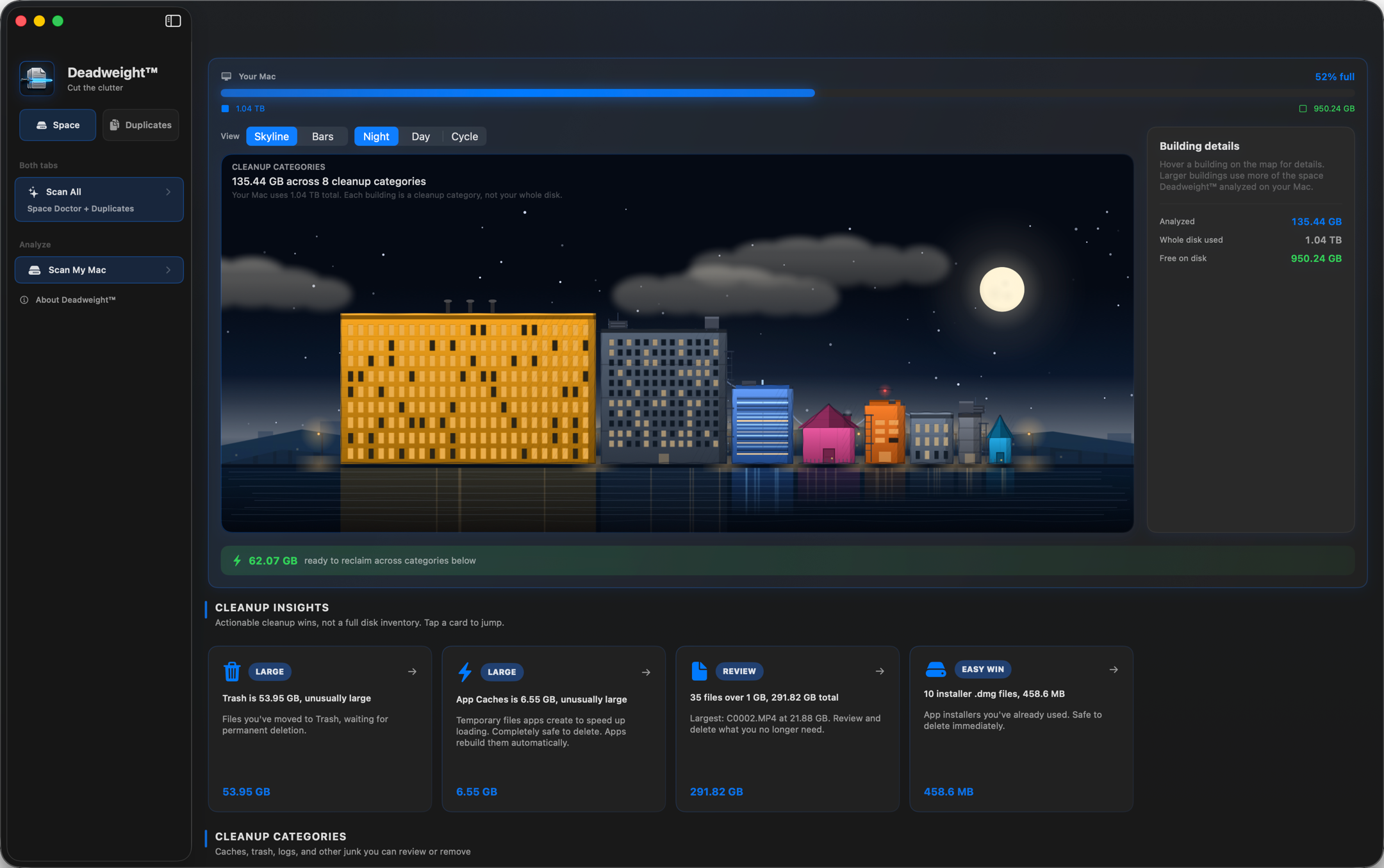
Space maps what is eating the disk. Duplicates hunts down byte-identical copies. Same window, no mode to learn.

One folder, your user folders, or the whole Mac. Nothing is scanned that you did not point it at.

The disk figures come from the same purgeable-aware numbers macOS uses, so this bar never contradicts System Settings.

One building per pile of junk, sized by what it actually costs you. Hover a tower for its numbers, or switch to plain bars.

Hardlinks and shared copies are left out rather than padded in, so the figure is what you can really expect back.

Each pile gets a plain-language name, a size, and a verdict on whether it is safe to clear or worth a look first.
Two kinds of weight pile up on a Mac: the build junk you never see, and the media that quietly copies itself. Deadweight goes after both.
The Downloads folder that became a junk drawer. Years of .dmg installers you opened once. The same vacation photos imported three times, an old iPhone backup, that 40 MB PDF saved in five places. Deadweight does the boring detective work, finding exact matches no matter what they’re named or where they’re hiding.
// the classic: a Downloads folder quietly holding 90+ GBXcode DerivedData. Simulator runtimes you forgot you installed. Archives from a version you shipped two years ago. A node_modules in every repo you ever cloned. Deadweight sorts them into categories you can clear without touching your projects or your configs. All of it rebuilds itself the next time you hit build.
// often 20–50 GB hiding in ~/Library/DeveloperYou imported the same card twice. The raw .ARW files live in the shoot folder and the edit folder. There are six bounce-downs of a mix you kept re-exporting. Deadweight puts the identical copies side by side, and moves the spares to the Trash while the one you are working from stays exactly where it is.
// "track_4.wav: 11 identical copies found"Most baseline search apps perform naive checks matching on filename and global size, which is a great way to lose work files that happen to share parameters. Deadweight demands proof first.
Every file is grouped by size. Anything with a unique size cannot possibly have a duplicate, so it’s dropped immediately. The cheapest filter runs first.
Surviving buckets get a fast fingerprint: the first 16 KB, the last 16 KB, and a few interior samples, hashed in parallel across your cores. Catches the obvious mismatches, including files that share a head and tail but differ in the middle, without reading whole files.
Only files that already collided get the expensive treatment: the survivors are streamed side by side in 1 MiB chunks and the actual bytes are compared, bailing at the first chunk that differs. The verdict comes from the bytes themselves, not from a hash of them, so there is no collision to gamble on. A match is a fact, not a statistical bet. (A file small enough that the head and tail reads already covered every byte of it is settled right there, because there is nothing left to read.)
A disk-cleaning app sees everything: your filenames, your folders, your life. Deadweight’s answer is not a privacy policy you have to believe. It is the absence of any way to leak it. There is no backend, no account, no embedded analytics. The app makes no network connections at all.
The whole app. No trial, no “pro” tier, no upsell, no catch.
Built it for myself, releasing it for you.
macOS will ask you to confirm the first time you open it, because Deadweight is given away directly rather than through the App Store. One time, about two minutes. How to open it, with video →
If Deadweight pulled its weight, you can make mine a coffee ☕. Entirely optional, deeply appreciated.
Yes, by design. Removals move files to the Trash, where they stay recoverable. Two actions are permanent, and both sit behind an explicit confirmation that says so: emptying the Trash from inside the app, and deleting a Time Machine local snapshot. Everything else can be restored from the Trash. And a “duplicate” is only ever shown after a full-content byte-for-byte comparison, so it really is byte-for-byte identical, not just same-name-same-size.
Most likely one of two defaults. Deadweight only considers files of 1 MB or larger, so small duplicates are ignored until you lower the minimum size in the app. It also skips dependency folders like node_modules, .git and DerivedData, because copies in there are churn rather than clutter and walking them is slow. Both are adjustable: drop the minimum size from the toolbar, and tick the dependencies box when you scan a single folder.
Usually, with one honest caveat. macOS can store two identical files as a single shared copy on disk (APFS clones, which is what Finder’s Duplicate and cp -c create), so trashing one of them may free less than the figure shown. Hardlinks are detected and never counted as reclaimable at all. The number is an estimate, and it is deliberately conservative about what it promises. macOS can also take up to a day to hand back space held by local snapshots.
Because Deadweight is distributed directly rather than through the App Store, and I’m an independent developer who hasn’t paid for Apple’s notarization service. The warning is macOS being cautious about any outside app, not a sign of trouble. Follow the install guide once and it never appears again.
Because I built it for myself and it costs me nothing to share. There is no account, no analytics, and no network code, so there is no business model hiding behind the price. You can confirm the network part yourself with a tool like Little Snitch. If you would like to support it, there is an optional tip jar.
It’s closed-source freeware, common for indie Mac utilities. You’re welcome to use it free of charge; I’ve simply chosen to keep the source private. The privacy guarantees don’t depend on reading the code: they come from the app having no network behaviour at all, which is observable from the outside.
An Apple Silicon Mac (M1 or later) running macOS 14 (Sonoma) or later, including macOS 26 (Tahoe). It’s a native Apple Silicon build and does not run on Intel Macs. Full Disk Access is optional but lets it read the Trash and system-cache categories.